Gallery View shows each page as a thumbnail of the page itself, rather than an icon or a filename.
Click the Gallery button at the top of the sidebar, or choose Gallery in the View menu. The Files button beside it goes back to the file list.
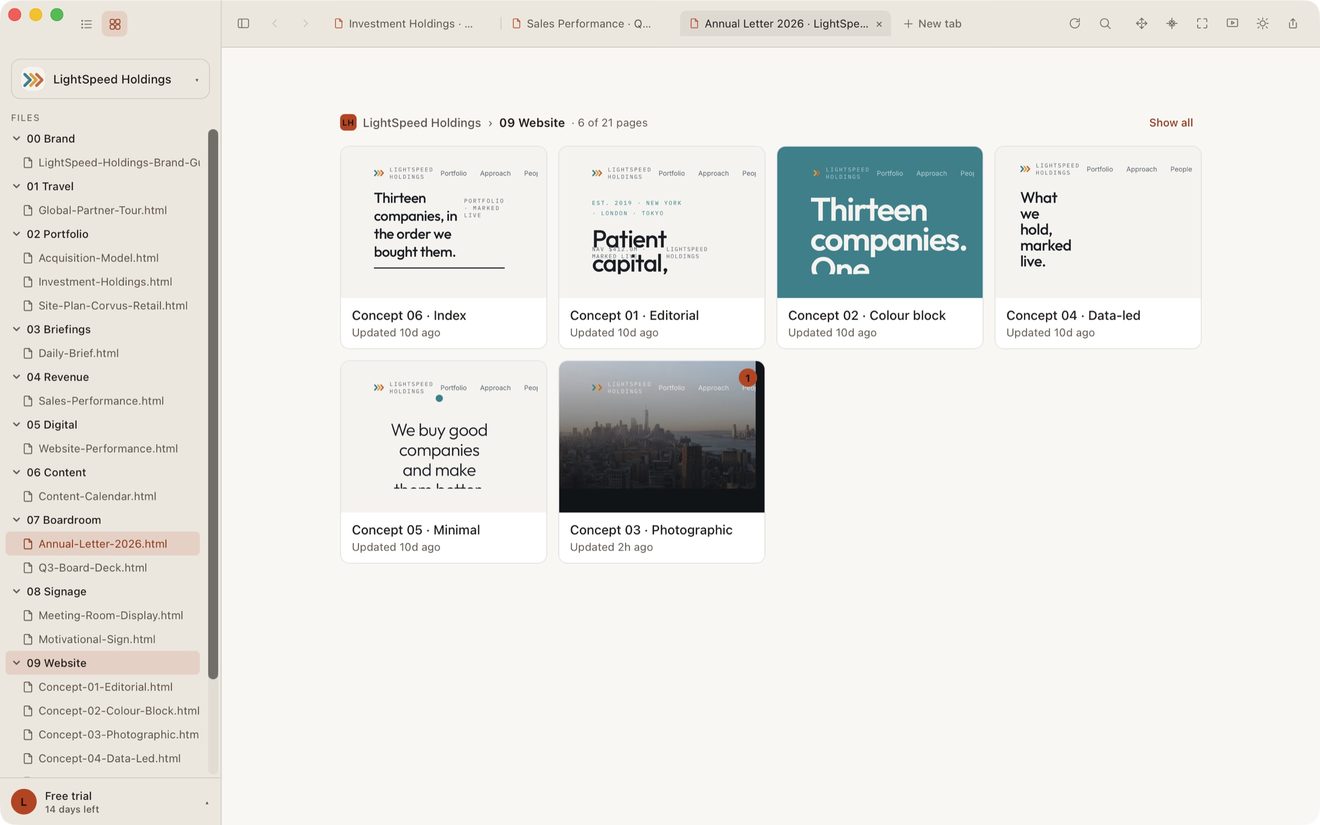
Click a folder in the sidebar and the gallery shows only that folder. The breadcrumb above the canvas says what you are looking at, and Show all clears it. Searching filters the gallery as well, by title, by path, and by the text inside your pages.
In a large Showspace the gallery shows 250 pages at a time. Click Show 250 more pages at the bottom to see the next ones.
Pages still in the cloud
A page that is not on your Mac yet shows its thumbnail if one of your Macs has drawn it, with ☁ Not downloaded underneath. Click it and it downloads and opens as usual.
A page no Mac has drawn says Click Refresh to make a thumbnail. lite.computer makes one by itself a few minutes after the page appears, or straight away when you click Refresh in the top bar or press ⌘R. It downloads the page, draws the thumbnail, and returns the page to the cloud, so only the small thumbnail stays on your disk. The card says Making thumbnail… while it works, and your other Macs, and anyone you share the Showspace with, get the thumbnail too.
A very large page, or one that plays video or sound, keeps its text card. Nothing is downloaded for a thumbnail in Low Power Mode, on a low battery, on a metered or Low Data connection, or when your Mac is short of space. To make thumbnails only when you click Refresh, change Thumbnails in Settings.
Shortcuts
⌘2 opens Gallery View, and ⌘1 goes back to the file list.
Still stuck? Write to support@lite.computer.